
5 Cheapest Ways to Classify Text with AI in 2026
Sorting text into categories is one of the most common jobs in apps that handle user messages. A support inbox sends tickets to billing or engineering. A comment section removes spam. A feedback form separates bug reports from feature requests. The same decision runs thousands of times a day, so the price of a single request adds up quickly.
We tested five ways to do this on the same support tickets and ranked them by cost, setup effort and results. Three of them are available through one account on AI/ML API, and two run on your own computer without any per-request fee.
Quick Ranking
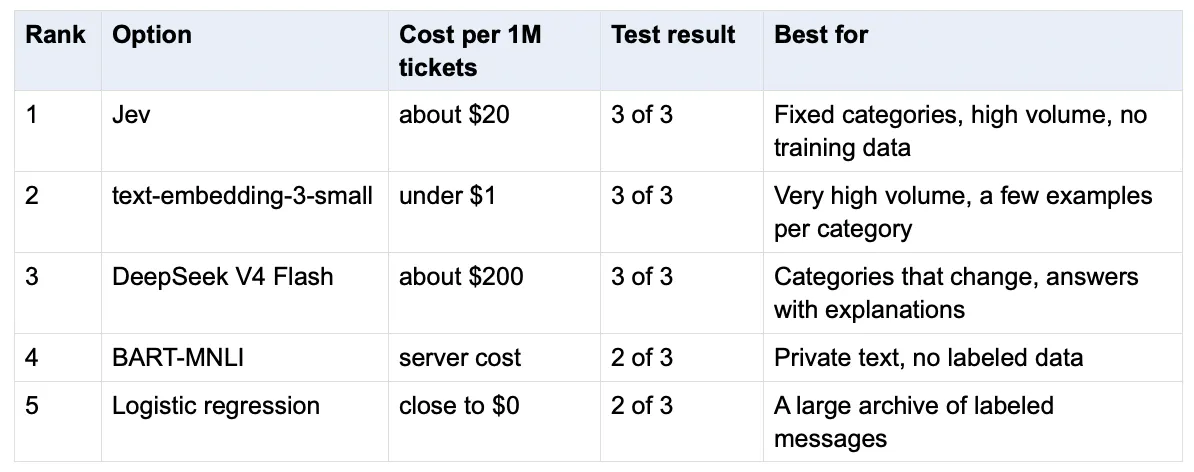
The ranking is by overall value for a team that starts without any labeled data. If you already have a large set of labeled messages, option 5 moves up. If you only care about the lowest price per request through an API, option 2 comes first.
How we tested?
Every option received the same three support tickets and had to send each one to billing, technical or sales. The tickets were:
- “Help! My payments have been failing for 3 days.” The correct team is billing.
- “The API returns a 500 error every time I upload a file.” The correct team is technical.
- “Do you offer a discount if we switch to the annual plan?” The correct team is sales.
API costs are calculated from the tokens each request used and the list prices on AI/ML API in late September 2026. Three tickets show how each option behaves but are not enough to measure accuracy. Before you choose, test your shortlist on a few hundred of your own messages.
1. Jev, Best Overall
Jev is a decision model from TypeSafe AI, released on 15 September 2026. It does not write text. You send it a message and a question with a fixed set of answers, and it returns the answer it picked, a confidence score and a probability for each option.
In our test. Jev sent all three tickets to the right team. The payments ticket got a confidence of 0.94 and the other two got 1.00. A simple rule for production is to pass answers below 0.8 to a person and handle the rest automatically.
Price. Jev charges for input tokens only, at $0.0578 per million. Each request used about 350 tokens, mostly for the question and the team descriptions. One ticket costs about $0.00002, which is around $20 per million tickets.
- Pros. No training data needed. A confidence score with every answer. About ten times cheaper than a small chat model on the same task. One request took about 0.9 seconds including the network.
- Cons. Text input only, up to 32K tokens. It returns a label and not an explanation.
Best for. Fixed categories, high volume and no time to collect training data.
2. text-embedding-3-small, cheapest API option
An embedding model turns a text into a list of numbers that reflect its meaning. You write a few example messages for each category and embed them once. Each new message then gets the category of the most similar example.
In our test. We used three examples per team, and all three tickets matched the right team. The similarity scores were close to each other (0.51 to 0.56), so the gap between the best and the second-best team was small. More examples per category make the method more reliable.
Price. The model costs $0.026 per million tokens. The three tickets used 39 tokens in total, which works out to about $0.34 per million short tickets. This was the cheapest API option in the test.
- Pros. The lowest cost per request among the API options. No model training.
- Cons. You have to write and maintain the examples. The margin between categories can be small.
Best for. Very high volume, clearly different categories and a few examples for each one.
3. DeepSeek V4 Flash, most flexible
The most common approach is to ask a chat model to pick a category and answer in JSON. We used DeepSeek V4 Flash, one of the cheaper fast models, priced at $0.39 per million input tokens and $1.56 per million output tokens.
In our test. All three answers were correct. The JSON answer itself is about 10 tokens, but the model billed 59 to 173 output tokens per ticket. DeepSeek V4 Flash reasons before it answers, and those reasoning tokens are billed as output at the higher price.
Price. With about 92 input and 102 output tokens per ticket, one request costs about $0.0002, which is around $200 per million tickets. That is roughly ten times more than Jev on the same task.
- Pros. You change the categories by editing the prompt. The model can explain why it chose a team.
- Cons. The most expensive option here. Hidden reasoning tokens make the real cost higher than the length of the answer suggests.
Best for. Categories that change often, or cases where you need an explanation with each label.
4. BART-MNLI, best for private text
BART-MNLI (facebook/bart-large-mnli) is an open zero-shot model. You give it a text and a list of category names, and it scores each name without any training. It runs on your own machine through the Hugging Face transformers library, so no API key is needed.
In our test. Two tickets were correct. The discount question went to billing with a confidence of 0.48. The model sees only the category names, and the word discount is close to billing in meaning. Descriptive names such as pricing and plans instead of sales usually help.
Price. There is no fee per request. The model is a download of about 1.6 GB. On our CPU the script took about 19 seconds including loading the model, so high volumes need a GPU.
- Pros. Text never leaves your servers. No labeled data and no API account.
- Cons. Large download, slow on a CPU and one wrong answer in our test.
Best for. Teams that cannot send text to an external service and have no labeled examples.
5. Logistic regression, best when you have data
This is classic machine learning. You train a small model on labeled examples with scikit-learn. It needs no API and no GPU, and each prediction takes milliseconds. To show what happens with too little data, we trained it on only 15 examples, five per team.
In our test. Two tickets were correct. The payments ticket went to sales with a confidence of 0.39. The model only knows the words in its training set, and the phrase failing for 3 days does not appear there. With hundreds or thousands of real labeled tickets this method often gets close to the accuracy of a large language model.
Price. Close to zero. Training takes seconds and predictions run on any CPU.
- Pros. Free to run and very fast. Full control over the model.
- Cons. Needs hundreds of labeled examples. It fails on wording it has not seen.
Best for. Teams with a large history of labeled messages and categories that rarely change.'
Which option to choose then?
- No labeled data, fixed categories and high volume. Choose Jev.
- Categories that change often or answers that need an explanation. Choose a small chat model such as DeepSeek V4 Flash.
- Very high volume and a few examples per category. Choose embeddings.
- Text that cannot leave your servers. Choose BART-MNLI or logistic regression.
- Thousands of labeled examples. Choose logistic regression.
The options also work together. A cheap first pass with embeddings or logistic regression can handle the clear cases, and Jev or a chat model can handle only the tickets where the first pass has low confidence.
The first three options use one API key and one endpoint on AI/ML API. To try other models on your own tickets, check prices and model IDs in the AI/ML API Models catalog.
FAQ
What is the cheapest way to classify text with AI?
Through an API, embeddings with a few examples per category are the cheapest, at under $1 per million short texts in our test. Without examples, Jev was the cheapest at about $20 per million, and it also returns a confidence score.
Can a chat model classify text?
Yes. Give it the list of categories and ask for JSON output. Check the output token count, because reasoning models bill their thinking as output, which can make a one-word answer cost many times more than expected.
What is zero-shot classification?
It means sorting text into categories the model was not trained on by passing the category names with each request. Open models such as BART-MNLI and most chat models can do it.