
5 Ways to Cut Hours of Raw YouTube Footage Without Scrubbing the Timeline

Scrubbing the timeline is the habit of dragging the playhead through raw footage to find usable moments. It works on a five minute clip. It falls apart on a two hour recording with six takes of every intro.
Most YouTube editing time goes to finding and removing material, not shaping the story. Retakes, false starts, long pauses and filler words pile up fast.
This guide covers five ways to cut that time. Each one replaces a manual search with a faster method. You can use them alone or stack them in one project.
How were these five ways chosen?
Each method was judged on four points.
- Time saved: how many manual passes through the footage it removes.
- Control: whether you can still inspect and change every cut.
- Footage fit: whether it suits talking heads, multicam or music-led projects.
- Setup effort: how quickly a solo creator can start using it.
Methods that hid their changes or needed a long setup ranked lower.
Which method fits which footage?
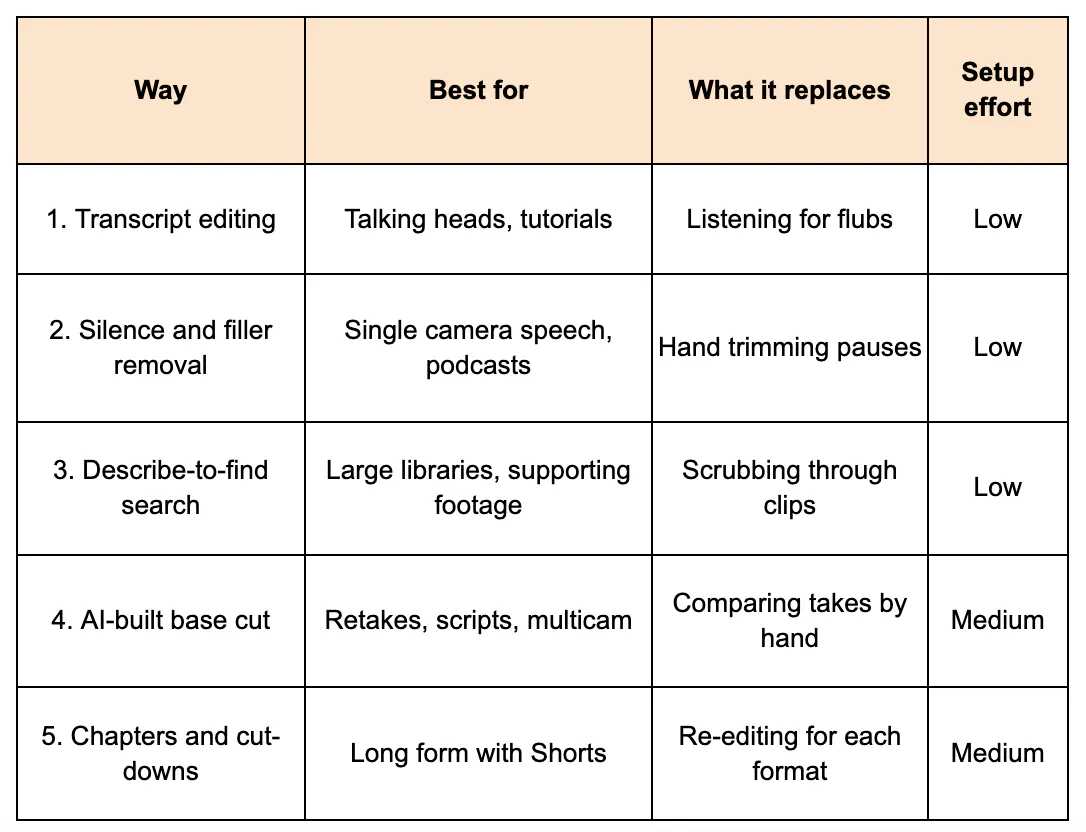
Way 1: Why cut from the transcript instead of the waveform?
Transcript editing lets you delete a sentence in text and have the matching video disappear. It turns a visual search into a reading task. Reading is faster than listening.
Read the transcript once. Strike the false starts, tangents and repeated lines. The timeline follows your edits.
Best for: Talking-head videos, tutorials and interviews with clear speech.
Where it falls short: It cannot judge visuals. A clean sentence can still sit on a bad shot.
Way 2: How does automatic silence and filler removal save time?
Silence removal detects pauses and cuts them in one pass. Filler removal does the same for words like "um" and "you know". Together they replace the most tedious pass in any edit.
Run it early, before you fine tune anything else. Then listen back once to catch cuts that feel too tight. Leave small breaths in, since a fully gapless voice sounds robotic.
Best for: Single-camera speech and podcast-style recordings.
Where it falls short: It cannot tell a dramatic pause from dead air. You still review the pacing.
Which platform handles these ways on one timeline?
You can combine a separate tool for each method. That means exporting, importing and re-syncing between apps. A single editor removes that friction.
Invideo Editor is a free youtube video editor that runs in the browser. It puts a multitrack timeline and AI editing agents in the same project. You give the agents your footage and direction, and they do the repetitive work on the timeline.
Every result stays editable. You can inspect each change and keep refining by hand. That matters when you want to override a cut.
Desktop editors still lead in some areas. The product itself notes that nested sequences and node-based colour grading favour desktop tools. If your project depends on those, plan a hybrid workflow, since cuts can be exported to Premiere Pro, Final Cut Pro or DaVinci Resolve.
The next three ways show where a combined setup helps most.
Way 3: How can you find a moment by describing it?
Footage search lets you type what you want instead of scrubbing for it. Describe a line of dialogue, an object, an action or an emotion. The tool jumps to matching moments.
In Invideo Editor, AI agents log footage by dialogue, actor, prop and camera angle. That makes a three hour library searchable. You stop opening clips one by one to remember what is inside them.
Best for: Large libraries, interviews and projects with lots of supporting footage.
Where it falls short: Results depend on clear descriptions. Vague prompts return vague matches.
Way 4: Why let an AI agent build the base cut?
A base cut is the first complete timeline built from usable footage. Repeated takes, mistakes, pauses and filler are already removed. It runs start to finish, so it is not a highlight reel.
Invideo Editor builds this through agentic assembly. Upload your footage, add a script if you have one, and describe the cut you want. With a script, the agent picks one clean take per line. Without one, it keeps each point once and drops the repeats.
Multicam works too. The agent syncs the angles and builds a layered cut. You then review the timeline and carry on editing.
Bring messy footage the first time. Clean single-take footage shows little, because there is nothing for the agent to clear away.
Best for: Long recordings with many retakes, scripted videos and multicam shoots.
Where it falls short: A base cut is a starting point, not a finished video. Story and rhythm stay your call.
Way 5: How do chapters and cut-downs reduce rework?
Cut-downs turn one finished edit into several versions. Chapters, highlights and Shorts all come from the same project. You avoid going back to raw footage each time.
Place chapter markers where the topic changes. Timestamps export formatted for YouTube. The first chapter must start at 0:00, and YouTube needs at least three in total.
For Shorts, branch a 9:16 version from the long edit and trim it under 60 seconds. Invideo Editor keeps the long cut and the Short in one project. You are not rebuilding from scratch for each format.
Best for: Channels that publish a long video plus Shorts from the same recording.
Where it falls short: Vertical versions still need a quick check of the hook by eye.
What mistakes slow down AI-assisted YouTube editing?
A few habits cancel out the time you save.
- Testing on clean footage: With one perfect take, there is nothing for the tool to remove.
- Skipping the review pass: Every automated cut deserves one quick watch.
- Over-trimming silence: Tight pacing can feel breathless, so keep natural breaths.
- Giving vague direction: "Make it good" gives the agent nothing to work with. Name the structure, topic order or script.
How do you start with an Invideo Editor on your own footage?
Go to ai.invideo.io and select Timeline Editor below the prompt box. Create a blank timeline.
Open Media and upload or drag in your footage. Create an agent and describe how you want the material assembled into a base cut.
Review the timeline, then keep shaping the edit. Pick a recent project with retakes. Time the old way against the new way, and keep whichever steps save you the most hours.
Conclusion
Scrubbing is a habit, not a requirement. Each of these five ways removes one manual search from your edit.
Start with transcript editing and silence removal for speech. Add footage search and a base cut as your libraries grow. Use chapters and cut-downs to turn one recording into several videos.
The tools take repetitive work. You keep the story, the rhythm and the final say on every cut.
FAQ
1. How do I edit a long YouTube video faster?
Remove the repetitive passes first. Cut from the transcript, strip silences and filler, and let an AI agent assemble a base cut from your best takes. Then spend your time on pacing, story and polish.
2. Can AI edit YouTube videos automatically?
AI can handle much of the execution, such as picking takes, removing filler and arranging clips. It works best as a first pass. You still review and refine the result for story and rhythm.
3. What is the best free video editor for YouTube?
It depends on the edit. Invideo Editor offers a browser-based multitrack timeline with free 1080p export and no watermark. DaVinci Resolve offers deep colour grading as a local install, so it suits colour-heavy projects.
4. How do I remove silence from a video automatically?
Use an editor with silence detection and run it on the full timeline in one pass. Then watch the result once and restore any pauses that were doing dramatic work. Keep small breaths so the voice sounds natural.
5. How do I make Shorts from a long YouTube video?
Branch a 9:16 version from your long-form edit and reframe it around the subject. Trim it to under 60 seconds, then check that the opening line works as a hook. Export it separately from the long video.