
How to Edit a Music Video With AI Without Spending Hours on the Timeline
AI music video editing is a workflow where software handles the repetitive timeline work. You keep the creative decisions. The AI sorts takes, trims dead footage, and builds a first cut for you to refine.
This matters because a music video shoot produces a huge amount of footage. Multiple angles, repeated performances, and B-roll pile up fast. Most of your editing time goes into finding usable moments, not shaping the story.
This guide shows how to edit a music video with AI without losing control of the result. You will see what to delegate, what to keep, and how to go from raw footage to finished cuts with far less grunt work.
Why does editing a music video take so long?
Music video editing is slow because the footage is repetitive by design. A single song gets performed again and again. Each pass is often shot from several angles. Every angle then needs to be synced, reviewed, and compared.
After that comes the matching work. Cuts need to land on the beat. Lip sync has to hold. The visual energy should rise and fall with the track.
None of this is creative in the early stages. It is sorting and nudging. You scrub through clips, mark the good takes, and drag them into place. Hours disappear before the real storytelling begins.
The creative part is the rhythm, the mood, and the moments you choose to linger on. AI is useful because it shrinks the sorting. You reach those decisions sooner.
What should you hand to AI and what should you keep?
Hand AI the repeatable execution and keep the creative judgment. The rule is simple. If a task follows clear rules, delegate it. If it depends on taste, keep it.
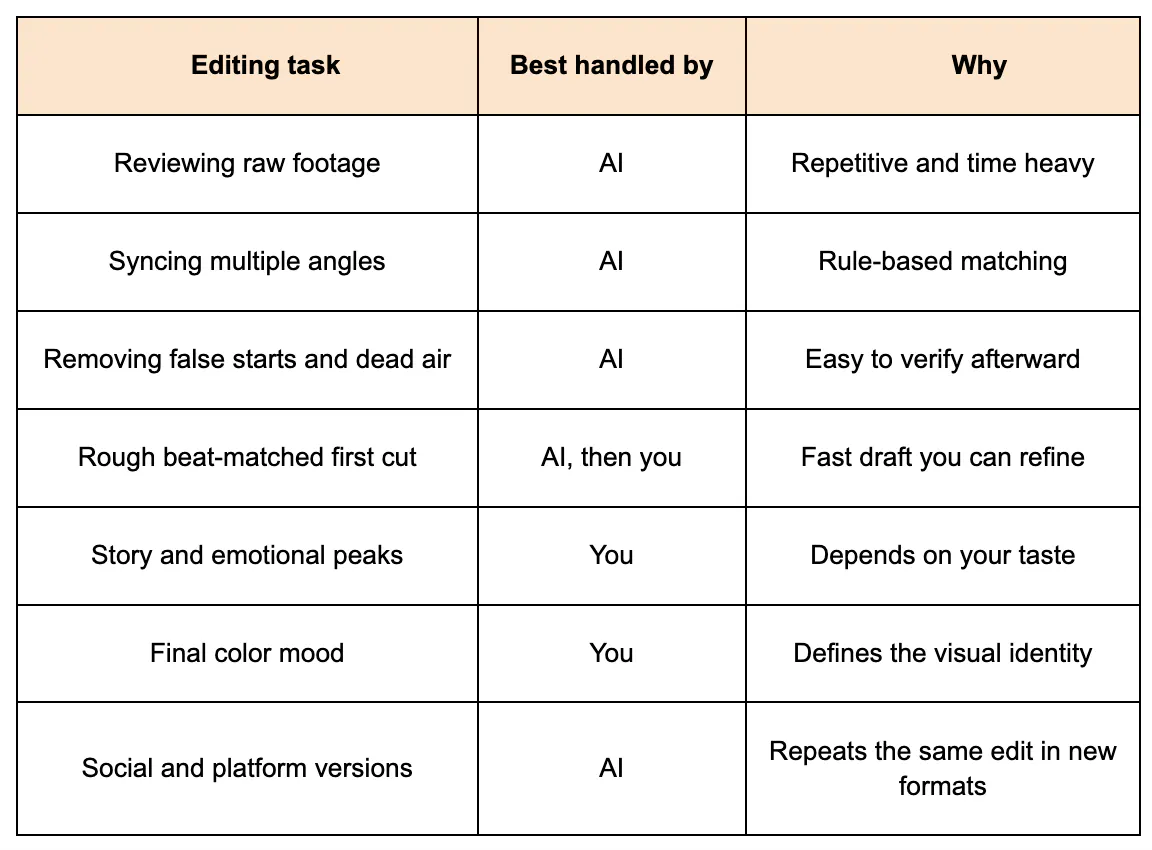
Notice the pattern. The AI builds the first draft and you judge it. That order keeps your style intact.
It also keeps you in the director’s chair. You are not accepting whatever the software produces. You are reviewing work the way you would review an assistant editor’s first pass.
Which platform works best for editing a music video with AI?
Look for three things before you pick a platform. Does it have a real timeline? Can the AI work directly on that timeline? Can you inspect every change it makes?
Many tools only offer one-click effects. These save minutes but not hours. You still do the real editing by hand afterward. Other tools generate a finished video that you cannot take apart.
Invideo Editor works as a music video creator that pairs a professional editing timeline with AI editing agents. You give the agents your footage and your direction in plain language. They do the assigned work on the timeline and hand back a result you can review.
This setup suits musicians, directors, and editors who want speed without giving up control. Every result stays visible and editable. You can adjust any cut by hand or ask an agent to redo it.
It also runs in the browser, so there is nothing to install. You sign up and start editing.
On cost, the manual timeline is free to use even if you never assign a single task to an agent. Full agent access sits on paid plans. Check the current pricing page for your region before you commit.
How do you build a base cut from raw music video footage?
Start with a base cut. A base cut is the first complete timeline assembled from your usable footage. Repeated takes, mistakes, and pauses are already removed. It runs start to finish and works as a starting point, not a final video.
Invideo Editor builds this through agentic assembly. Go to ai.invideo.io and select Timeline Editor below the prompt box. Create a blank timeline, then open Media and upload your footage.
Add lyrics or a transcript if you have them. Then create an agent and describe the cut you want. You can direct it by song structure, story, or shooting order.
A good instruction sounds like this: “Build a base cut that follows the song structure. Use the cleanest performance. Keep the wide shot for the chorus.” The agent reviews the material, picks the usable takes, and lays the audio and video onto the timeline.
Bring messy footage the first time you try it. Clean single-take footage will not show you much. There has to be something for the agent to clear away.
How do you cut to the beat without nudging every clip?
Beat matching is where hours quietly vanish. You drag a clip, play it back, and nudge it two frames. Then you repeat that for every cut in the song.
Hand the first pass to the agent instead. Invideo Editor can arrange footage around a music edit or beat pattern. That gives you a rough rhythm to react to instead of a blank timeline.
Play the result with the track on. Mark the moments that feel early, late, or flat. Those are the spots that need your attention.
Then refine in plain language. Try instructions like “Slow the pacing in the second verse” or “Hold the close-up longer on the final line.” Restructuring and pacing changes happen through words, not through dragging clips one by one.
Keep your own eyes as the final judge. If a cut feels wrong, fix it by hand. The agent handles the mechanics, and the taste stays with you.
How do you handle color, sound, and versions faster?
Once the cut is locked, the finishing work begins. This is another area packed with repetitive steps. Each one is a good candidate for delegation.
For color, match footage across angles first. Then shape the overall tone of the sequence. Consistent color makes a multi-camera shoot feel like one world.
For sound, clean up any dialogue and balance the mix. Behind-the-scenes clips and intro scenes often need this. A short pass here makes the whole project feel more polished.
Versions are where creators lose the most time. A single music video usually needs a vertical teaser, a lyric clip, and a few social cuts. Invideo Editor can turn a finished project into trailers, highlights, and platform-specific versions. You skip the cycle of rebuilding the same edit in each new format.
What mistakes should you avoid when editing a music video with AI?
A few habits separate smooth AI workflows from frustrating ones.
- Accepting the first draft blindly. Always review the timeline. The AI gives you a base, not a verdict.
- Giving vague direction. “Make it good” tells the agent nothing. Name the structure, the shots, and the feel you want.
- Skipping the lyrics. A transcript or lyric sheet gives the agent a clear map to build against.
- Over-processing the footage. Heavy effects can bury a strong performance. Let them breathe.
- Forgetting to plan versions early. Know your platforms before you start. It makes the cut-down stage much easier.
Final thoughts
You do not need to spend hours on the timeline to make a strong music video. Most of that time goes to sorting, syncing, and nudging. Those are tasks AI can take on.
Build a base cut first. Let the agent rough in the rhythm. Then spend your energy on the parts only you can do, like the story, the mood, and the moments that make the song hit.
Try the workflow on one project. Use messy footage, give clear direction, and review everything. You will quickly see where the time savings come from.
FAQs
Can AI edit a music video?
Yes, AI can handle much of the repetitive editing work. It can review footage, pick usable takes, remove false starts, and assemble a first cut. You still make the creative calls, such as pacing, mood, and which moments to emphasize.
How do you edit a music video to the beat?
Start by importing your track and footage into one timeline. Place your major cuts on the main beats and use faster cuts for high-energy sections. An AI agent can build a beat-led rough cut for you, which you then refine by hand.
How long does it take to edit a music video?
It depends on the footage volume, the number of camera angles, and the level of polish you want. Most of the time goes into reviewing takes and syncing cuts. Using AI for those early steps can shorten the process noticeably.
What is the best way to organize music video footage before editing?
Group clips by camera angle, song section, and take numbers before you start. Add lyrics or a transcript so you have a clear structure to build against. Good organization also helps AI agents pick the right takes faster.
Is there a free AI video editor for music videos?
Some editors offer free access to their core tools. Invideo Editor lets you use the manual timeline for free, even if you never assign a task to an agent. Full AI agent access requires a paid plan, so check the current pricing for your region.