ClipTalk
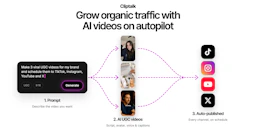
Cliptalk is an AI video creation tool that transforms ideas into ready-to-post videos for social media, automating editing, captions, and B-roll footage.

Side-by-side features, pricing, and active deals — pick a different matchup any time.
Cliptalk is an AI video creation tool that transforms ideas into ready-to-post videos for social media, automating editing, captions, and B-roll footage.
AI-driven tool for image transformation and video generation.
| Feature | ClipTalk | Synthesys |
|---|---|---|
| Top features | AI Video Creation — Turn ideas into ready-to-post videos for social media platforms. · Auto-Editing — Automatically edit video clips based on user prompts. · Auto-Captions — Generate quick and precise captions to enhance video reach. | AI Avatars — Easily create personalized avatars for various uses. · Voice Cloning — Generate unique voiceovers with realistic sound. · Fast Video Processing — Quickly produce videos without delays. |
| Pricing model | Freemium | Paid |
| Free plan | Yes | No |
| Active deals | — | — |
| Categories | Content Creation Tools, Video Generators, AI Assistant | Content Creation Tools, Video Generators, AI Assistant |
| Website | Visit ClipTalk | Visit Synthesys |
Cliptalk offers several pricing plans to accommodate different user needs:
New accounts receive 50 free credits to try the service, with videos created on the free plan carrying a watermark.
Synthesys offers several pricing plans, starting with the Indie plan at $20/month when billed annually, which is designed for creators and marketers. The Studio plan, suitable for professional content teams, is priced at $41/month annually. For larger agencies, the Agency plan is available at $83/month when billed annually.
Annual billing provides substantial savings, allowing users to save 40% across all plans compared to monthly subscriptions. Custom solutions are available for enterprise users, with tailored volume discounts and dedicated account management.
For complete and current pricing details, interested users can visit the official pricing page.
Choosing Synthesys means opting for a user-friendly video generation solution that combines advanced AI capabilities with intuitive design. Unlike traditional video editing tools, Synthesys simplifies the content creation process, allowing anyone to produce high-quality videos with just a few clicks. This makes it an ideal choice for those looking to amplify their creativity and output without the steep learning curve of conventional software.
Furthermore, with robust support for individual and business-scale needs, Synthesys is able to adapt to different workflows, ensuring that all content creators can achieve their goals effectively and efficiently.
ClipTalk is freemium while Synthesys is paid, so ClipTalk is the cheaper way to start.
Neither tool has active deals right now — new deals are added regularly, so check back soon.
The tools overlap heavily — compare their feature lists above to spot the differences.
Both ClipTalk and Synthesys are Content Creation Tools, Video Generators, AI Assistant tools, so they can cover similar use cases.
More matchups featuring ClipTalk or Synthesys.