Pictory vs Video Candy

Side-by-side features, pricing, and active deals — pick a different matchup any time.

Pictory - AI Tool Profile and Logo Preview

Pictory

PaidVideo GeneratorsVideo EditorsContent Creation Tools

Convert articles, scripts, or images into short social videos using AI Video Generators with auto-captions, voiceover, and brand templates to speed production.

Top deal: Black Friday: 50% OFF on all plans

Video Candy - AI Tool Profile and Logo Preview

Video Candy

FreemiumVideo Editors

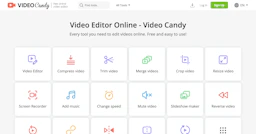
Free and easy-to-use online video editing tool with all essential features.

⚡ Key Differences

  • Only Video Candy has a free plan
  • Only Pictory has active deals (26)
  • Only Pictory: Video Generators, Content Creation Tools, Marketing

At a Glance

Pictory vs Video Candy at a glance
FeaturePictoryVideo Candy
Top features
  • Convert articles, scripts, and URLs into ready-to-share videos to cut production time.
  • Auto-captioning, searchable transcripts, and AI voiceovers for faster edits.
  • Brand controls with templates, logos, and color presets to maintain consistency.
  • Compress VideoReduce the file size of your videos.
  • Trim VideoEasily cut unwanted sections from your videos.
  • Merge VideosSeamlessly combine multiple video clips.
Pricing modelPaidFreemium
Free planNoYes
Active deals26 active—
CategoriesVideo Generators, Video Editors, Content Creation Tools, MarketingVideo Editors
WebsiteVisit PictoryVisit Video Candy

Which One Should You Pick?

Choose Pictory if:

  • You need Video Generators, Content Creation Tools, or Marketing
  • You want its 26 active deals

Choose Video Candy if:

  • You want to try it free before paying

Features

Pictory

  • Convert articles, scripts, and URLs into ready-to-share videos to cut production time.
  • Auto-captioning, searchable transcripts, and AI voiceovers for faster edits.
  • Brand controls with templates, logos, and color presets to maintain consistency.
  • Exportable assets and integrations for Video Editors to finalize projects.
  • URL-to-video and highlight extraction to repurpose long-form content efficiently.

Video Candy

  • Compress Video — Reduce the file size of your videos.
  • Trim Video — Easily cut unwanted sections from your videos.
  • Merge Videos — Seamlessly combine multiple video clips.
  • Crop Video — Remove unwanted areas from your videos.
  • Resize Video — Adjust video dimensions to fit your needs.
  • Screen Recorder — Capture your screen with ease.
  • Add Music — Enhance your videos by adding background music.
  • Video Converter — Convert videos to different formats.

Pricing

Pictory

Paid plans are available. Check the official site for current details.

Video Candy

Current pricing details are available on the official pricing page.

Why Choose Each Tool

Pictory

Fast text‑to‑video conversion with built-in captioning and team tools for consistent, branded output that reduces manual editing time.

Video Candy

Choose Video Candy for its straightforward interface and a complete range of video editing features available for free. Perfect for both beginners and experienced users looking to edit videos quickly and efficiently without hassle.

Frequently Asked Questions

Is Pictory cheaper than Video Candy?

Video Candy is freemium while Pictory is paid, so Video Candy is the cheaper way to start.

Do Pictory or Video Candy have active deals?

Pictory has 26 active deals on AI Tools Saver; Video Candy currently has none.

What can Pictory do that Video Candy can’t?

Pictory adds Video Generators, Content Creation Tools, Marketing on top of what both tools share.

What do Pictory and Video Candy have in common?

Both Pictory and Video Candy are Video Editors tools, so they can cover similar use cases.