GPT Image 3 free online
GPT Image 3 Free Online is an AI-powered tool designed for generating and editing images. It combines an image generator and a photo editor into a single workspace, allowing users to create visuals and refine them through conversational interactions.
This tool is ideal for marketers, content creators, and anyone in need of high-quality images for social media, product photography, or graphic design. Users can easily upload reference photos, describe their desired edits, and receive tailored results without switching between different tools.
With GPT Image 3, users can enhance their creative process by keeping all prompts, source images, and results connected, enabling seamless follow-up edits and adjustments. The AI agent interprets user instructions in plain language, making it accessible for both beginners and experienced professionals.
- AI Image Generation — Create visuals from text prompts using advanced AI models.
- AI Photo Editing — Edit existing images with a conversational interface, allowing for iterative changes.
- Reference-Based Creation — Use reference images to guide the generation and editing process.
- Integrated Workflow — Keep prompts, source photos, and results connected in one workspace for seamless editing.
- Multiple Output Formats — Generate images in various resolutions and aspect ratios to suit different needs.
- Iterative Refinement — Make precise adjustments to images without starting over, maintaining context throughout the editing process.
GPT Image 3 offers a variety of pricing plans to accommodate different user needs:
- Free access available for basic use.
- Monthly plans: Basic, Pro, and Studio with increasing credits.
- Annual plans provide significant savings, up to 50% off monthly rates.
- One-time credit packs available for project-based work.
Why to choose GPT Image 3 Free Online?
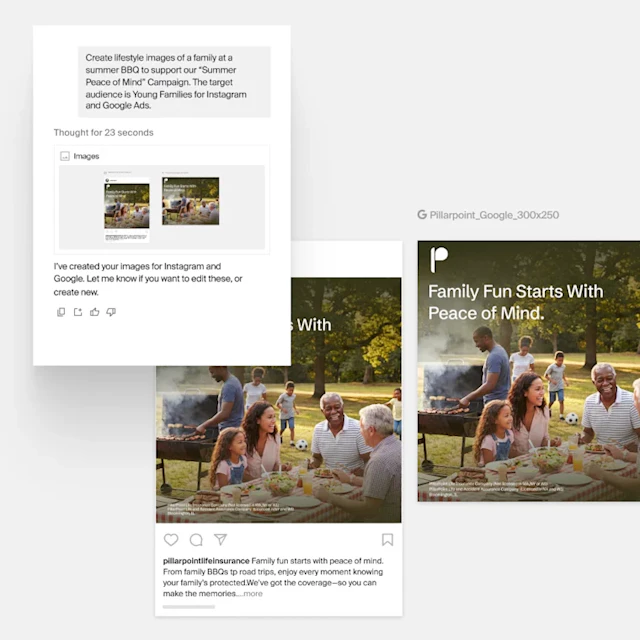
- Integrated AI Agent: Combines AI image generation and photo editing in a single workspace, allowing users to maintain context across multiple edits.
- Conversational Editing: Users can describe changes in plain language, enabling a more intuitive and streamlined editing process without switching tools.
- Reference-Based Workflow: Allows users to upload reference images and keep them connected to the editing process, ensuring that edits are consistent with the original vision.
- Iterative Refinement: Supports continuous editing by letting users make precise adjustments to selected results without needing to restart the prompt.